Cool update to the XWFIM, Portable Install

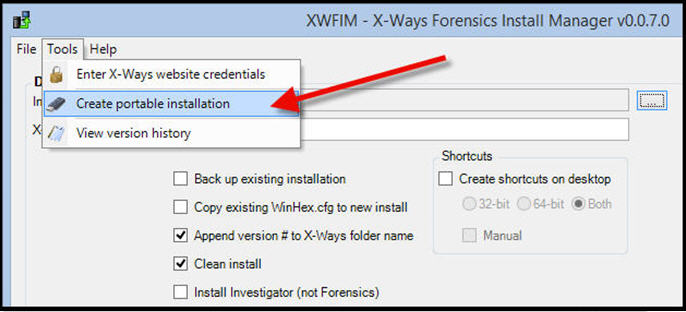
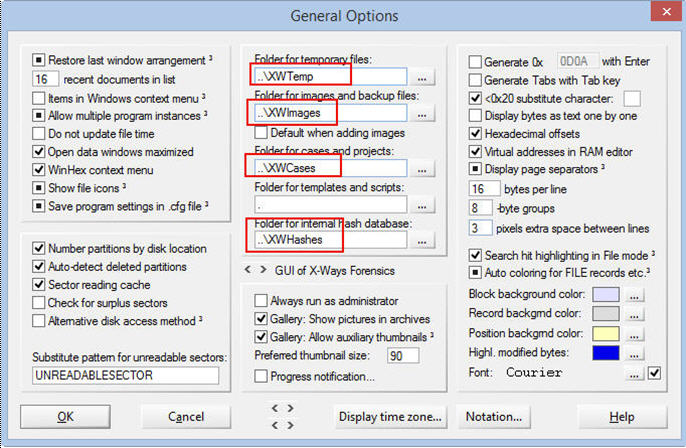
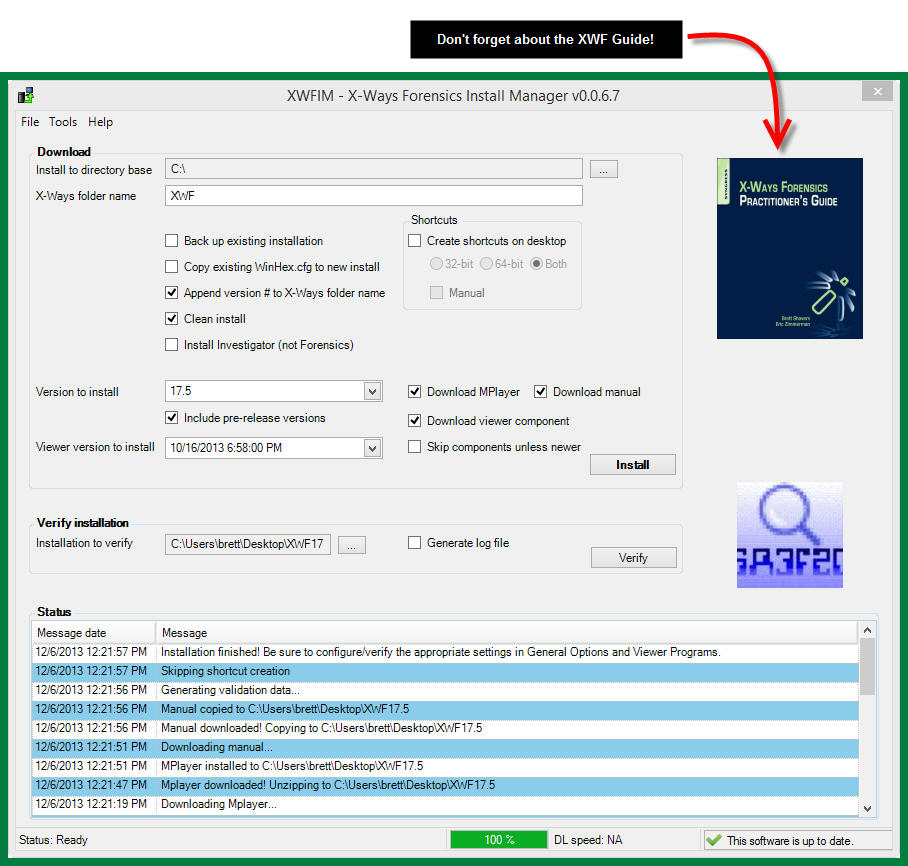
Eric is at it again.  This time with a pretty cool update to the X-Ways Forensics Install Manager (v0.0.7.0).  The update to the XWFIM now includes an option to create a portable install to external media.   Page 13 of the Practitioner’s Guide to X-Ways Forensics details how to do this manually, but XWFIM does it for you with a few clicks.

portable
Easy enough


drive letter
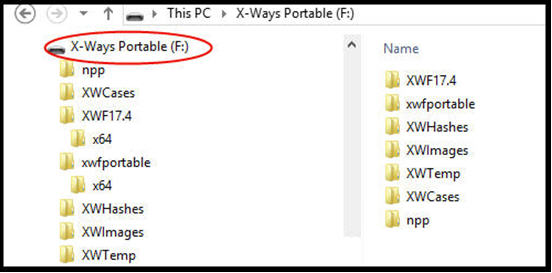
Cool! Notepad++ and Volume Label renamed.


result
Bam! Done.


Another cool little feature is that the XWFIM creates all the case folders for you in the process of the portable install.  Neat.

folder
I like this. Saves a few keystrokes and I’m all about saving keystrokes.


Don’t forget, if you liked the Practitioner’s Guide to X-Ways Forensics, write a review on Amazon to let us know how you liked it (or if you didn’t…).  And if you use XWF and didn’t buy the guide…you are missing out on more than a few tips and tricks that will save you dozens of keystrokes.

X-Ways Forensics Install Manager

I cannot imagine anyone who uses XWF not having Eric Zimmerman‘s XWFIM.   Every time I use it, I wonder how I did without it.  XWFIM is available through the XWF support forum.  It’s free, but you need a license for XWF to get it.

Eric constantly adds little things to it, much like Stefan adds ‘little’ things to X-Ways Forensics.  One of the latest little additions is the selection box to “Include pre-release versions” which is pretty cool.

xwfim


And if you haven’t bought the XWF Guide yet and you use the XWFIM, just click the book’s graphic and you can have the guide on your Kindle in about 30 seconds.

xwfim2

X-Ways Forensics Imaging Article

In case you missed an article on X-Ways Forensics Imaging (page 40), you can download a free copy of the issue of eforensicsmag here:  http://eforensicsmag.com/jumpstart-3-free/

XWF Imaging
You may like the WinFE article too…I know the guy that wrote that article…

brief

The article is an overview of imaging with X-Ways Forensics, which is covered in more detail in the XWF Guide.   If you haven’t bought the guide yet and are on the fence on whether XWF is right for you, check out the article on the one feature of imaging and I am sure you will not be on the fence anymore.

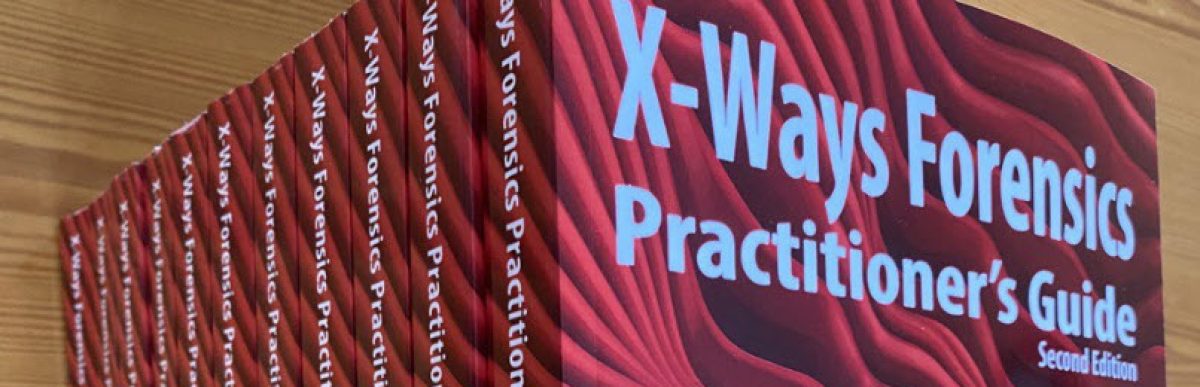
Xways-Cover
I use this guide myself…and I was a coauthor!

XWF Guide translations

There is a possibility that the XWF Guide may be translated into Chinese and Korean.  That would be pretty cool.  I can at least look at the pictures 🙂

Image  Image

X-PERT Certification Program

Been using X-Ways Forensics for a while now, have ya?  Been to an X-Ways training class?  Then consider getting certified by X-Ways as an expert (X-PERT) in XWF.

X-PerThttp://www.x-pert.eu/

Be sure to set aside time, have your XWF Guide at your side, and dive right in.  It’s a real forensics exam that if you pass, have a certificate that actually means you know what you are doing with X-Ways.

Something else cool about XWF

Consider the differences between X-Ways v12 below:

v12
X-Ways Forensics version 12

With the current version 17:

X-Ways Forensics version 17

They look the same!

XWF has had literally hundreds upon hundreds of significant updates over this time between v12 and v17, but the interface and usage remains constant.  Personally, I enjoy an update to a program that looks the same, the buttons are in the same place, and there are new features to use.  The last thing I want is a totally different interface, buttons where I have to hunt and peck to find or miss completely, or have to take another class from the vendor to be told how to use their new fandangle program.

It’s nice to know that in 10 years, XWF will probably look the same, even though I know it will be able to do so much more then, I’ll be able to use it without skipping a beat.

This is also the reason that the XWF Guide will carry you through the next many years without having to worry about a major change in operation of XWF.  What other manual or guide can say that?

Cloud Storage Forensics and XWF

Cloud Storage
Amazon link to order

I recently finished tech editing a book soon to be published on Cloud Storage Forensics.  One of the main tools used was….wait for it…X-Ways Forensics.   Without giving anything about the book away, I was really impressed by the level of detail documented on the amount of research conducted in cloud storage forensics.

The book goes to print in January, but available for preorder.  I’ll be writing a review of the book once it is made available, but in short, I give it a high grade of technical accuracy and research on the most commonly used cloud storage services and the connected machines.  The authors documented testing of various cloud services as if it were scientific examinations (which by the way, digital forensics testing is…) and their methods can be used by anyone as can their results.  I’ll give a small tidbit that there are many instances of “holy smokes!” on some of their findings that I have not seen anywhere else.

The authors could have chosen any major forensic tool, but they chose XWF.  This is just another example of how X-Ways Forensics is used to validate scientific theories and tests over all others.  The reason is simple:  XWF works.

This book, along with a few others that I know are coming out fairly soon, should be quick sellouts for the first printing.  For anyone that buys books from Amazon, preordering is a good way to go and Amazon price matches books, even after you have already ordered.  Just saying…

Imaging with X-Ways Forensics

The current (and free) issue of eForensics Magazine has an article on imaging with X-Ways Forensics.   Of course, the XWF Guide is more detailed, but to get an idea of some of what XWF can do with imaging,  take a look at the article.

eForensics_17_2013-11
http://eforensicsmag.com/jumpstart-3-free/

X-Ways Forensics and WinFE

winfeA faster WinFE build is available on http://winfe.wordpress.com/ that includes a script to add XWF to the build.  Of course, you have to have a license for XWF for the script to add it to the build.  As of now, it includes FTK Imager and dd tools, with more on the way to add.   The build method is a beta only because more apps are being added that need to be tested.  Other than that, it works great with FTK Imager, XWF, and a few other small apps.  The goal is to put several imaging options on it for user preference.

Have 10 minutes to spare? Then you can build a WinFE bootable USB or CD.
Have 10 minutes to spare? Then you can build a WinFE bootable USB or CD with XWF installed on it.

There is no difference between the write protection in this faster build as it uses Colin Ramsden’s write protection application, but the main difference is that you can build a WinFE ISO file in less than 5 minutes, start to finish.  You can burn it to a CD or make a bootable USB within 5 more minutes, giving you a WinFE in about 10 minutes time, starting from pushing the button and having a WinFE CD/DVD/USB in your hand.

Although this is meant to be the fastest method to build an acquisition boot OS, with X-Ways, you can still do a heck of a lot more than just imaging with WinFE.  And just because it only takes 10 minutes doesn’t mean WinFE is a minor forensic tool.  With XWF, WinFE is way more than just something you can throw together to image.  It’s really neat.

Creating distributable test images

I’m in the process of creating working materials to go along with the XWF Guide in the form of exercises and test images.  I expect to be finished in 2014 or 2015 or …(it all depends on time available).  The materials will be freely available but will really only work best with the XWF Guide.  And yes, I know I can use images already available, like at http://digitalcorpora.org/corpora/disk-images, but these datasets will be made to demonstrate all the neat things detailed in the XWF Guide.wipe
One thing I’d like to point out regarding an issue with creating forensic images when giving images to students that contain data may violate the EULA if distributed. Files like commercial programs and operating systems.  Anyone that deals with this in training will be happy with how XWF can be used to address this problem.

With the “Cleansed Image” option of XWF, simply exclude/hide any and all files that would violate any privacy concerns or EULA violations before creating the image. Then create the image 🙂

This gives you a complete (minus excluded files) disk image without worrying about violating a EULA.  You could do this the hard way by using WinHex to overwrite every single file in question.  Or you can mass exclude files in one fell swoop with XWF and bam.  Image done.  Now you have something to give out to your class.

I’ve always wondered why some instructors give out complete images of a single system and make the student “promise” not to distribute the files…that is a bit too trusting in my opinion.   And come on, you know who you are…

<and I’ll leak a little information from the book on the cleansed image feature.  you can use this technique to remove private/privileged/protected data from an image to comply with a court order but can’t produce specific protected data on the image.  an example being a civil case where you need to turn over an image to the opposing expert but have privileged files on the image. don’t hex edit it, cleanse it!>

The XWF Guide has dozens of these kinds of tips and tricks, but you get one today for free.  Get the book for the rest of the tips and tricks, you will without a doubt, find something worthwhile that will save you hours or days of work.